The Coppermine Integration plugin to integrate images of the Coppermine album in WordPress. This plugin was originally created by Stilglog, was taken by Guillaume Gautreau then after a few updates to WordPress and since by Mathias Decker. For my part, I took the latest version (4.5.3) developed by Mathias and I corrected some problems and I adding new options. La version française cet extension est disponible ici.
- Fix of the repetition of images in the window « More Images »
-
Fix the previous version (The image browser)
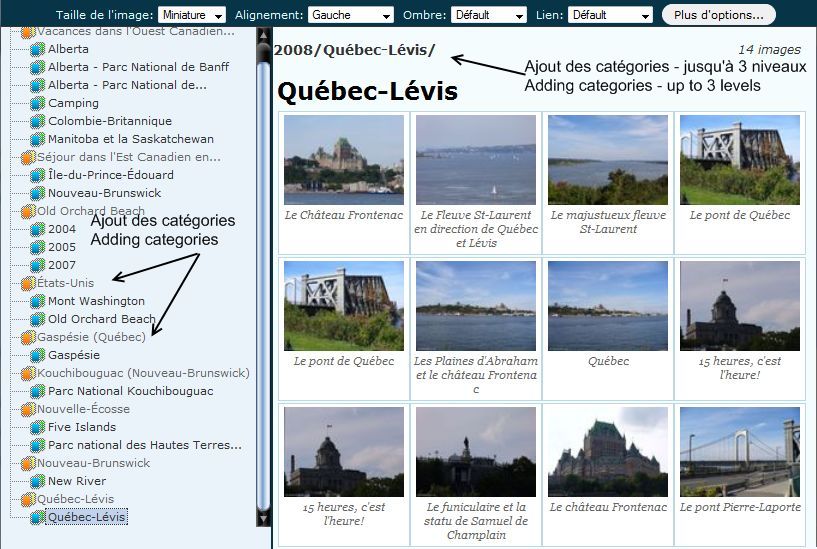
- Add the immediate category in the list of albums in the options « groups » to better distinguish albums of the same name but in different categories.
- Adding of categories immediately in the tree to the « more images » as well as the display of categories once in the image explorer (Is not active if more than one level of user )
|
|
|
- Added a function to automatically import the EXIF information from the lightbox window where they are not available (correction of the problem caused by updating to 1.14.20 Coppermine)
-
Fixed problem that don’t center a group of picture (function [group] [/ group])
- Restore the table xxx_exif from the backup.
- If you don’t have a backup copy, you must manually go into each image in Coppermine. As you browse each image, the EXIF information will be automatically returned to the table xxx_exif and the information will again be available in the lightbox window through extension Coppermine Integration.
-
Download the version 4.6.2.5 of Coppermine Integration…
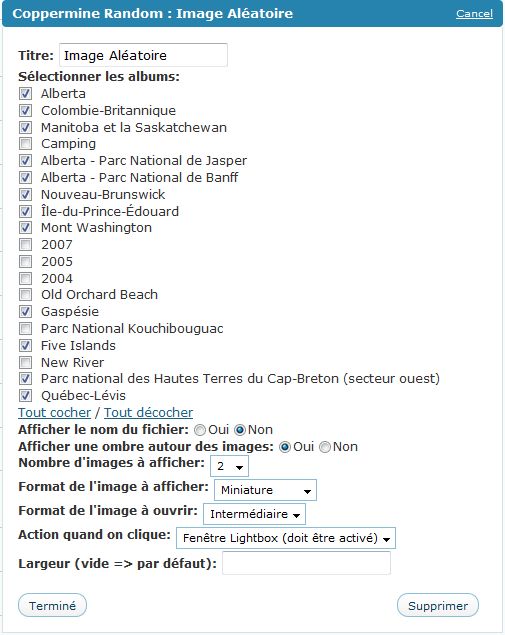
- Added a widget to display random image in the menu bar.
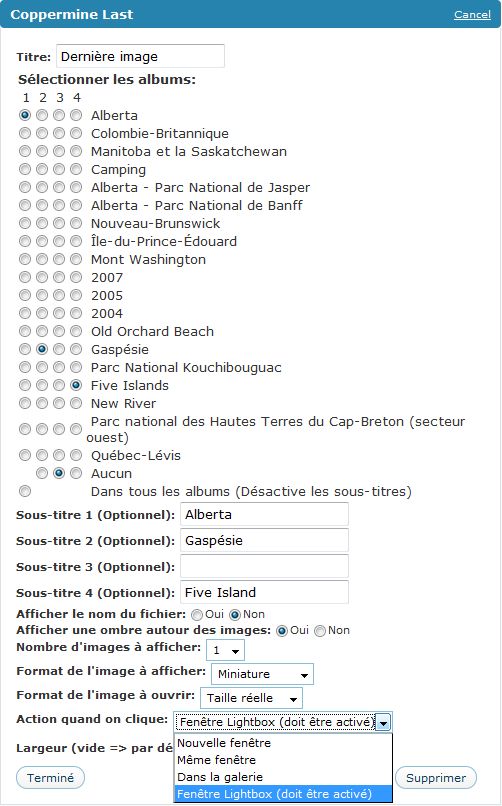
- Added a widget to display last image in the menu bar. (up to 4 albums)
-
Added an option to disable titles by default and custum title.
- Updated wp-login.php and wp-update.php for compatibility with Coppermine 1.4.19 (last version)
- Use cpg configuration instead of hardcoding ‘thumb_’
- Changed some code to displaying information in the configuration of the plugin (overflies an item)
- Option for include an image in excerpts (yes or no)
-
Return of the tag [group][/ group] Allows you to group images.
-
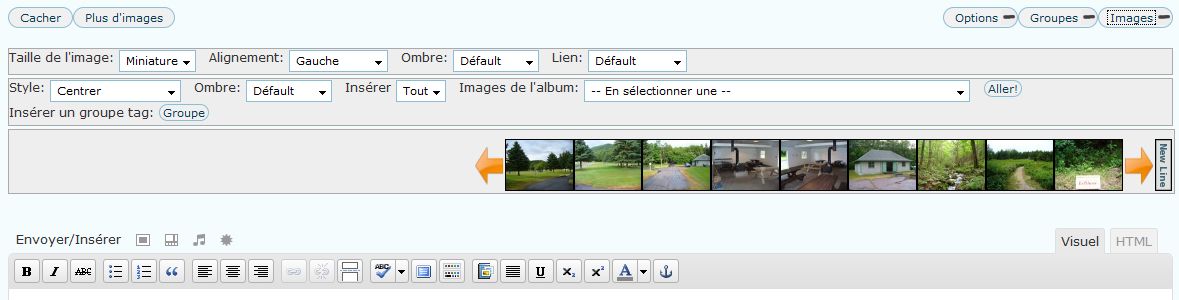
Improvement in the menu in window image selecter.
- Opportunity to change the size and put a title customize in banner mode. (default 512 px by 96 px and title is: cc: {blog name})
|
|

|
|
- Improved display of EXIF data in lightbox (display and missing data)
- Added information lightbox (max aperture, orientation, source file, compression, type scene, program exposure and resolution)
- Added a style (CSS) to display an album. (directed by Arnaud)
- The date issue is now fixed -> Default is American (01/29/2009). British date (29/01/2009) format if WordPress is defined as -> define (‘WPLANG’, ‘en_GB’ )(wp-config.php)
- Small patch on image size and intermediate size (conflict)
- Added skins for lightbox
- Fixed some minor problems and a few additions (lightbox)
- Fixed the compatibility with other images (lightbox)
- Fixed alignment problem of recent images in IE
- Fixed a problem scrolling recent images
- Added the possibility to see or hide the Smilies Bar in the window lightbox (admin)
- Adding a summary translation of the German extension (+ 60% done)
Adding skins lightbox
- Added 2 menus to easily customize the size of each image (image and thumbnail)
- Design of the configuration page resembling more design of WordPress 2.7
- Design of the window image selector closest design WordPress 2.7
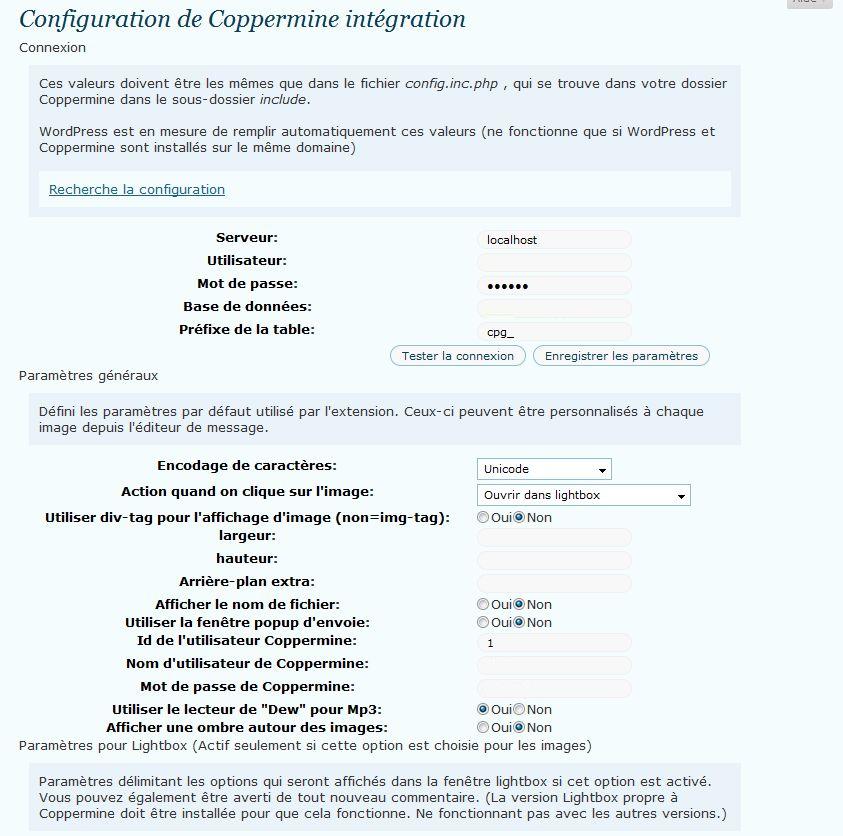
|
|
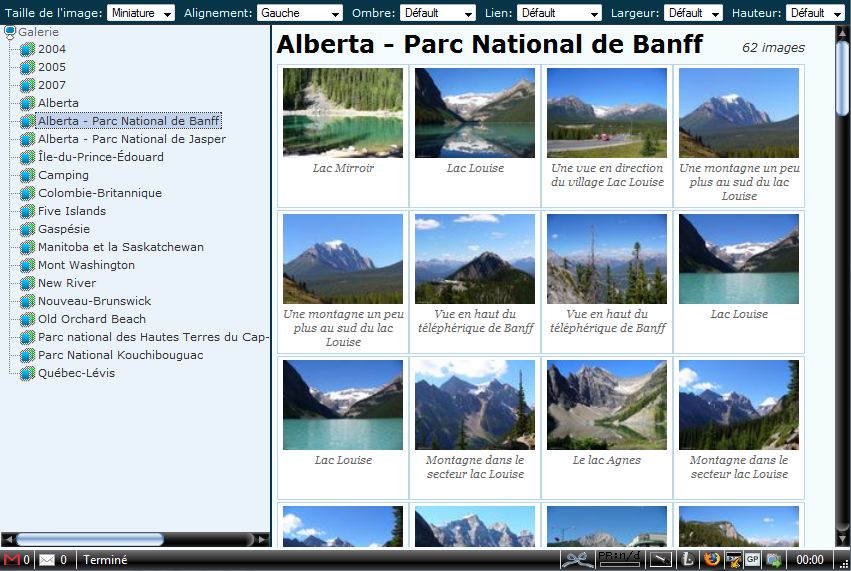
|
|
- Possibility to change the size of thumbnails from the configuration without having to use div-tag (leave empty width and height dimensions to keep the default)
- fixed a problem with inserting image
Change of version 4.5.3 to version 4.6:
- The plugin has been revised to allow full support for language file. (.po, .mo, .pot)
- Translation of the plugin in French (English is the default language for installation)
- All plugin tables are now variable.
- The prefix files intermediate size is also variable. (Before it was set to « normal_ » )
- Add mode banner directly from the menu (method developed by Mathias)
- Buttons in the message editor similar to the version 2.7 of WordPress
The majority of improvements in for the mode « lightbox »:
- Fixed a problem to receive an unlimited voting by the same user
- Fixed a problem to count the same visitor several times each load image
- Fixed a problem with an average of erroneous votes
- Fixed time sending a message from the window ( time zone)
- Fixed form of the message blank
- Back to the line of a commentary (only for comment in Coppermine)
- Changing images before and after (plugin lightbox)
- Add a background color in the numbering of images to enhance viewing (plugin lightbox)
- Added files needed to bring the lightbox plugin French
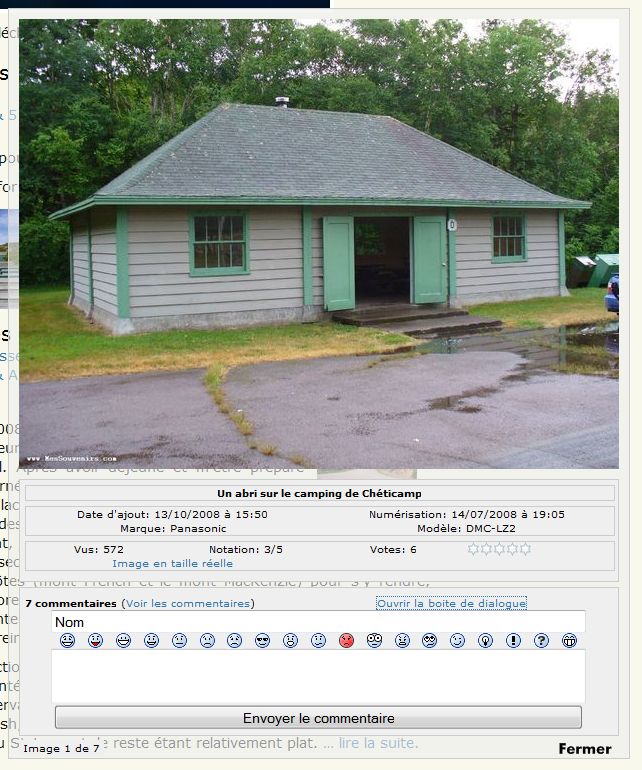
- Display smileys in the comments as an image
- Adding a bar to insert smileys in comments easily
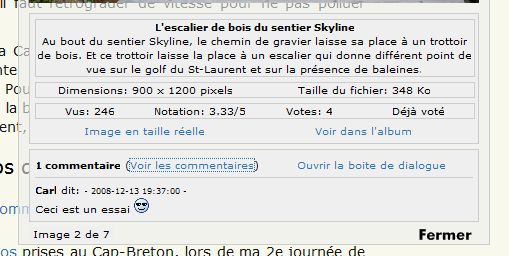
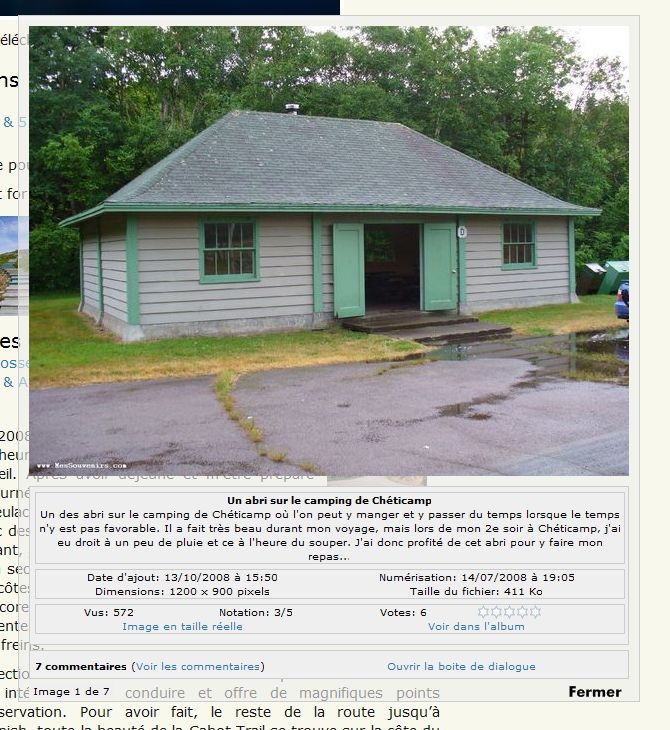
- Added a link to view or hide comments
- Add a link to full size image
- Add a link to see the picture in the Coppermine album
- Add title, description, date added, date and time, date digitization of the image size, the file size (B, KB, MB), make, model of the device, the focal length, ISO, metering mode, max Aperture value, flash, exposure time and everything with the possibility of choose what we want to see directly into the admin.
- Added the possibility to see or hide, comments, links (full size or album) and number of votes and directly into the admin.
- Adding a notification to the administrator for any message left on an image (select yes or no in admin.)
Download Coppermine Integration 4.6.2.7 (March 15, 2009)
Coppermine Integration 4.6.2.6 – Not available because this problems (February 22, 2009)
Download Coppermine Integration 4.6.2.5 (February 14, 2009)
Download Coppermine Integration 4.6.2.4 (February 8, 2009)
Download Coppermine Integration 4.6.2.3 (January 18, 2009)
Download Coppermine Integration 4.6.2.2 (January 14, 2009)
Download Coppermine Integration 4.6.2 (December 31, 2008
Download Coppermine Integration 4.6.1.1 (December 30, 2008)
Download Coppermine Integration 4.6.1 (December 23, 2008)
Tags: album, coppermine, coppermine integration, lightbox, plugins, wordpress

3 janvier 2009 à 16:17
I wonder how to use the converter. I ran the script, and it showed all the posts using CPG tags, with the images translated.
I wonder how can i makes this changes permanent on post content, i´d like to stop using the plugin as i moved to another gallery.
3 janvier 2009 à 16:32
I do not understand the meaning of your questions.
Poedit lets out all the CPG tags can be translated. To translate the plugin in a language other than English or French, import all the tags with Poedit, translate and record it as the coppermine-de_DE.po for German example et put in lang folder. For translation in Poedit, simply click on an item and write the translation in the window below.
Translated content of Coppermine? It’s not possible. And Why?
Moved to another gallery?
3 janvier 2009 à 16:45
SORRY!
What i meant was convert [image:xx:xx] to html tags inside the post content.
coppermine-converter.php searches for posts with either [thumb] or [image] and applies the cpg_filter to that content echo´ing it to the browser. I wonder how can i do this to the actual post content. What i did earlier was apply the cpg_filter when i save a post…so i was editing and saving every post on my blog..but there´s like 500. I just wonder if there´s any way to apply this coppermine-converter to all the posts already on my db.
3 janvier 2009 à 16:54
(and by post content i mean the one stored on the database, not the one the user sees on the blog after the cpg_filter was applied)
3 janvier 2009 à 17:12
Sorry,
I never use coppermine-converter.php and I don’t see too much what it does. It allows you to leave all posts tagged with the plugin and then?
Do you want to replace the tags [image:xx:xx] by the direct links
? And no longer be dependent on the plugin?
If so, I can make the changes necessary, but it will be the risk that your bdd wrong. (So, a backup forward.)
3 janvier 2009 à 17:15
Actually, that´s it. I don´t want to be dependent of the plugin.
Is it possible to do a mysql query for all the posts that have the tag, and apply cpg_filter to that content and save it? i can try it with a local copy for testing.
3 janvier 2009 à 17:20
It’s probably possible. Wait a minute, I make the changes necessary…
3 janvier 2009 à 17:53
Download here and replaces the file in the coppermine folder. It remains to be tested, because I don’t test on my data. Thank you to tell me if it works properly … or not.
3 janvier 2009 à 18:10
Well, i got the successful message, but i still the CPG tags on the post content.
3 janvier 2009 à 18:17
I look at it …
3 janvier 2009 à 18:20
(i´m using WP 2.2.3 by the way, i don´t know if that has something to do with the table on which the content is being updated)
3 janvier 2009 à 18:28
I found the problem, but I see no solution yet. The problem is that the update is on the table Coppermine and not WordPress.
3 janvier 2009 à 18:41
isn´t the table you are selecting wp_posts ? and then updating post_content inside it? that´s why i can understand from the script you made.
3 janvier 2009 à 19:17
Yes, that’s right. I import data wp_posts and I want to update it. The problem is that after converting the data, it remains connected to the bdd of coppermine and updating of WordPress don’t work.
And I have no solution.
Someone else maybe?
3 janvier 2009 à 19:26
you mean by the CPG script used to open image files (displayimage.php)? because, i can still keep my old CPG install just for backwards compability (as it relays on its own). With this, i just get rid of the integration.
3 janvier 2009 à 19:55
what I am saying is that the file coppermine-converter.php read it initially in WordPress data, uses Coppermine Integration to convert [image:xx:xx] in html code and then remains connected to the Coppermine data. That is why the update does not work (WordPress data). All that is independent of coppermine files.
And I can not find the solution to this problem.
Sorry!
3 janvier 2009 à 20:51
I see…
Well, what i was doing was this:
add_filter('content_edit_pre', 'cpg_filter' );// add_filter('the_content', 'cpg_filter' );
I changed the filter so everytime i saved a post, it applied the filter to the saved content instead of the displayed one.
Well, i´ll upgrade to WP 2.7 which allows you to mass edit posts, guess that will make this a bit easier.
thanks anyway!
10 janvier 2009 à 21:03
You add code to your messages and it works?
14 janvier 2009 à 13:21
Hi,
I found this plugin only recently and just started experimenting with it. After some initial setup problems, the connection is working fine now, using connected, but non shared data-bases.
I can publish the complete content of an album in a post of page, the way I want it. Great !! I’m just not completely happy with the layout.
I’m unable to insert spaces and/or borders between the thumbnails when using the [album:51,0] syntax. Could you explain how to use the tag, or the stylesheet to achieve this? Couldn’t find any documentation about this, and was unable to discover myself.
When putting individual thumbnails next to each other the layout looks nice, but this is for more work.
Thanks,
Arnaud
14 janvier 2009 à 15:38
Well, it’s good that this plugin is still in development because there are no equal alternatives. But I have a problem since updating to the latest versions. Not realy a bug and I think the solution can’t be difficult.
When linking the thumbnail with « Direct » than it’s linked to the resized « normal_ » prefixed image but I want to show the original unresized picture. What can I do?
14 janvier 2009 à 16:18
I am having a difficult time installing your plugin. I have WordPress 2.7 and Coppermine 1.4.19. When I upload the coppermine plugin folder to wordpress, I don’t have a link that says « Go here to configure ». Instead I have an entry called Coppermine Integration under the settings block of the WordPress admin sidebar. I click on this and I can set up the database information. I copied the information exactly from config.inc.php in the coppermine folder, including putting « localhost » for the server. The problem is that when I go to make a post, I can use the gallery browser to see my galleries, but the images don’t show up. When I insert them, it puts the base url as coppermine.sourceforge.net instead of the url of my gallery. I have installed my gallery on a subdomain called gallery. How do I tell the plugin where to look?
Thanks for an otherwise excellent plugin.
14 janvier 2009 à 20:07
@Arnaud
For documentation, it don’t, unfortunately, and I discover some function to hide as I wander through the code of the latter. This would add an interesting… next time.
For the layout of images with the [album:xx], there is nothing from the layout to fix this (can not just matching the images or add the shadow … )
To adjust the layout, I don’t know if it worked by defining it in the file coppermine.css. The class is called a defined « cpg-album-image ». It not exists in this file.
I would have to do some tests to confirm the procedure … but I can not promise it for this weekend.
14 janvier 2009 à 20:32
@Erik
I made the necessary changes in version 4.6.2.2 and the result should be the same as versions 4.5.3 and earlier. The « full size » is used against if there is no intermediate image (normal_). I don’t see how else do otherwise. ???
14 janvier 2009 à 20:44
@Jamie
Installing the plugin is done since the sidebar WordPress admin. As wordpress and coppermine are not in the same folder, you just have to rewrite the login information in the config.inc.php file of Coppermine. WordPress is it at the root of the server or in a folder? If you test the connection, you have errors or correct? Did you save the settings?
Login, password, database, prefix are correct? Check if you have any error messages and try to find the cause of your problem tomorrow… sorry for not being able to do more tonight.
15 janvier 2009 à 6:57
I added the below syntax to the coppermine.css file, and now do indeed see spaces between the images. I’ll play a little bit with it to optimize it for my layout, but this is great. Thanks for the quick answer.
/* album view */
.cpg-album-image {
float: left;
padding: 3px;
margin-right: 7px;
margin-bottom: 7px;
}
16 janvier 2009 à 22:37
Apologies for witing in English … it is my only language
I have had to make a chnage to get the Date Time to show correctly.
// Kym changed this line $picture_shooting = strftime(__('Date Time: %m/%e/%Y to %l:%M %p','coppermine'), strtotime("$dpm/$dpj/$dpy $dph: $dpmin"));
to
$picture_shooting = strftime(__('Date Time: %d/%m/%Y at %I:%M %p','coppermine'), strtotime("$dpm/$dpj/$dpy $dph: $dpmin"));
Partly this changed the date format of course (dd/mm/yyyy) but « %l » should be « %I » also.
My camera is a Canon Powershot and I cannot get ISO to display properly … it shows « ISO: 52429600″ rather than the correct value of ISO 800. Photos taken with other cameras are fine, just thosewith the Canon Powershots I have are a problem.
Any ideas?
16 janvier 2009 à 23:12
For the date and time, I want to make change, but I don’t understand the difference. In English, I have month/day/year to hour/minute (pm or am) with %m/%e/%Y to %l:%M or d/%m/%Y at %I:%M. Bizarre that you are not the same result.
For your other problem, I’ll try to make changes that I hope will solve your problem. To better help me, can you send me a photo (original) taken with your camera (Canon Powershot) so I can see if these changes work?
17 janvier 2009 à 0:44
Carl
The copy I downloaded at line 159 in coppermine-details.php definitely has a « 1″ (the digit one) rather than an « I ». Also, in English we would say « 29/01/2009 at 10.56 pm » rather than « 29/01/2009 to 10.56 pm ».
I have sent an original by email, note that this was shot at ISO 800.
Thanks for investigating.
17 janvier 2009 à 1:23
For date problem, I just understand. It’s that Canada (English) and the United States, the format of date is month/day/year and in British English format is the same as in French, is days/months/year. This is the problem! For the « at », I take note. As for the date, I will find a solution to this format to be compatible « 2 English ». For %e vs %d, the first is « 6″ and le second « 06″.
I received your picture and when I have a minute, I’m looking for a solution…
17 janvier 2009 à 19:10
@Kym
I found a solution to the problem of « ISO ». Normally, it should be available Sunday evening.
18 janvier 2009 à 0:45
Excellent news Carl … I look forward to trying it out. Thanks again.
By the way, I looked at some of you great photos … what a beautiful country! While I am a fair bit older than you (53) I also have a small compact turbo, a VW Golf GT Sports 1.4 which is both supercharged and turbocharged! It goes very well, although not as well as a WRX. I have a mate with a WRX exactly the same as yours.
I would love to take my Golf for a drive on some of the roads in Canada!
18 janvier 2009 à 16:06
Thank you Kym! VW Golf 1.4 GT Sport is not a WRX, but the size it must move.
It was indeed beautiful road in Canada. I have traveled more than 20 000 km in Canada during my 4 travel outside the province I live (Quebec). Where do you live?
I hope that the new version of the plugin will correct the problem of ISO. I believe, but I did not get the same problem with your image.
18 janvier 2009 à 22:29
I live in Glenalta, a hills suburb of Adelaide in South Australia. We too have some wonderful roads!
Thanks for your work on this, the data issue is now fixed but sadly it has not fixed my problem with ISO. I have since determined that this is in fact a problem on the Coppermine side, and even then really with Canon Powershots. It is described here
http://gallery.menalto.com/node/55248, and I imagine the same problem exists when laoding images to Coppermine. Looks like I will have to live with it. I can see now that your code reads EXIF data from the database, not the image, which makes sense. The correct ISO value is not stored on the database for my images, just the value that is returned by « ISOSpeedRatings ».For my camera by the way I have found that using « ShutterSpeedValue » gives me a better formatted value than « ExposureTime ».
Thanks again for your efforts.
18 janvier 2009 à 22:30
Oops, that should have read « the date issue is now fixed … », sorry.
19 janvier 2009 à 8:41
Hi Carl,
The Coppermine plugin version 3.11 had a feature to include a thumbnail picture in excerpts. It included a thumbnail picture with rss feed too, which was nice.
I didn’t find the option from the current plugin.
That would be a nice option, of course it is up to you, if you have time and motivation to do it.
Best regards Seppo
19 janvier 2009 à 18:58
@Kim
Australia? It’s surely you have good roads. (And not just the landscape here.) I love the Formula 1 Grand Prix in Melbourne. Simply beautiful!
Exif data were also imported from the database before, but less effective. For the ISO, the problem is with your Coppermine. With the picture you sent me, I don’t have problem and I have ISO 800. Do you have the original version of Coppermine or a modified version? Problem plugins? What version of Coppermine? 1.4.19 is the latest version.
« Shutterspeedvalue » is better than “ExposureTime”? No problem, if Coppermine the read, I can add to the plugin. Let me add that I believe those who are concerned the people, but if you have others. I can add without a problem!
To date, it will be correct if your WordPress is defined as British English. If your WordPress is defined as Australian English? You can rename the file coppermine-en_GB.mo in coppermine-en_AU.mo. The date will be in the good format.
19 janvier 2009 à 19:08
Hi Seppo,
I did not know that these functions already existed. I know that plugins since version 4. Do you have a link where I could download this version to see the result and see what has since been removed and if it’s possible to restore these functions?
Thank you!
20 janvier 2009 à 1:03
I can send you version 3.11 via email.
____________________________________________________
Here is a list of Coppermine 3.11 features:
Last Changes: version 3.11 – Aug 28 2006
* Added an option to disable titles by default. Use :T to enable the title for one picture, or t=mytitle to set a custom title.
* Added an option to include a picture in excerpts. Allows you to have mini thumbnails in the category pages, like this one.
* implemented cpg_last_comments and cpg_last_comments_mixed
* Use cpg configuration instead of hardcoding ‘thumb_’
* Changed some code to avoid warnings with E_NOTICE enabled.
* Display a scrollbar for the inserter bar in Konqueror.
* Updated wp-login.php and wp-update.php for compatibility with Coppermine 1.4.9
* Moved the newline inserter to a more visible position.
20 janvier 2009 à 18:17
I think some interesting options … I just found a link to download this version. I look at this weekend if everything goes well
21 janvier 2009 à 18:35
Hi again Carl.
« I love the Formula 1 Grand Prix in Melbourne. Simply beautiful! » – not as good as it was when it was in my home city Adelaide! Melbourne stole it from us back in the 90′s!
« Exif data were also imported from the database before, but less effective. » – I hadn’t bothered to look into the code too deeply, I wasn’t trying to suggest that a major change had been made.
I am using the latest version of Coppermine. « For the ISO, the problem is with your Coppermine. With the picture you sent me, I don’t have problem and I have ISO 800. » This comment has helped me enormously … I think I have found the problem after reading this!
Before uploading to Coppermine I have been processing my images with a utility called « JpegSizer » which reduces them in size while keeing the EXIF data intact. However, after your last reply, I have examined my original image and the re-sized version and have found that Windows Explorer has the ISO correct in the original but BLANK in the resized image!
I presume therefore that the issue is actually with JpegSizer and will contact the developer for his comments.
Thanks so much for your help, and your work on the plugin. I’ll let you know how I get on.
Long comment … sorry!
21 janvier 2009 à 19:02
For my part, I look the F1 since 1996, since the first Grand Prix in Melbourne… Since the arrival in F1 of Jacques Villeneuve. The sad is that it will don’t have Grand Prix in Montreal.

For the EXIF, not view that information is in table before,
hence the change.
For your photo, I have upload the photo original. For my part, I resize the images with this software: Irfanview.
23 janvier 2009 à 19:02
@Seppo
I installed version 3.11 on a different configuration and I have question. I made some changes to the next version of plugins (force title, thumb_ variable, better display configuration information, wp-login.php and wp-update.php compatibility with Coppermine 1.4.19, but otherwise I don’t not see the result.
Added an option to include a picture in excerpts? I not see difference between the option enabled or not. An example, an explanation?
Implemented cpg_last_comments and cpg_last_comments_mixed… This changes anything? Since it does not use the plug-in 3.11?
To display a scrollbar for the inserter bar in Konqueror, in don’t use this and I don’t see how. And I downloaded version does not mention. Same version that you?
For newline inserter, at left or at right, it’s the same thing.
24 janvier 2009 à 6:27
If I remeber right, the option was visible at a configuration panel (where you can go via wordpress) There it was possible to choose an option « show thumbnails with excerpt » or something like that.
After that, if wordpress is set to show the excerpt of the story (or when the achives lists the excerpts of the stories), there was also visible the thumbnails of the images. Nice option, if you happen to have a cartoon or photo site for example.
Also the thumbnails were visible if the feed was set toshow excepts only, also nice option.
If I have time, I will try it with my local playgroung site.
Cheers Seppo
24 janvier 2009 à 10:16
Yes this option is visible in configuration panel, but I did not see any difference. Hence my question of what it option.
I’ll give this option, but it’s hard to test without seeing the result, I can not guarantee that it works for the next version.
24 janvier 2009 à 10:52
@Seppo
I just added this option to the plugin and it works. This feature works only on excepts, hence my problem. My current theme does not support it, but I found another one.
You will just waited the release of the next version of the plugin. Another suggestion?
29 janvier 2009 à 19:20
Hi,
I´m using v4.6.2 (will upgrade to 4.6.3) and i´m getting a very weird behavior. My thumbs are linked to:
javascript:void(window.open('http://www.plataformaarquitectura.cl/cpgarq/displayimage.php?pid=361&fullsize=1" ,'','toolbar=no,status=no,resizable=yes,width=756,height=730'))
And as you can see, there´s a » closing the link when it should be a ‘
is this a type somewhere in the code?
29 janvier 2009 à 19:27
the line of code (493) that produces that output is:
return "javascript:void(window.open('{$cpg_base}displayimage.php?pid={$image->pid}&fullsize=1','','toolbar=no,status=no,resizable=yes,width={$width},height={$height}'))";but it has the correct quotes. i don´t know why the quote after the uri gets converted to « .
i´m using php5.
29 janvier 2009 à 19:39
I’m using also php5 and I have no problem. (You can see the result on the last (2) photos of this post.) This section of code has not been changed since at least version 4.5.1…
I don’t understand why ‘ becomes » ? Do you have a link to a page on your site where I could test if the popup works correctly for me. The problem is maybe your browser. You use what?
29 janvier 2009 à 20:25
Carl,
I use firefox 3.0.5 on both mac and pc.
this is a page with the resulting code:
http://www.plataformaarquitect.....rousselle/
29 janvier 2009 à 22:19
I have the same problem on Chrome, Firefox and IE.
Did you have same problem with version 4.5.1 of this plugin? Install other new plugins?
Your problem is really weird! I don’t understand the code change.
This « " » is also too much in the code of your page at the end of each image. But why?
I am sorry to not find a solution.
29 janvier 2009 à 22:44
i was using stilog version of the plugin before jumping to 4.6.2
yeah… it´s so weird. i wonder if there´s other way to escape the ‘ ?
29 janvier 2009 à 23:03
could replacing return with echo help?
30 janvier 2009 à 11:20
Do you use version 3.11 of the plugin before? If so, the code was the same to open a popup. I looked to recreate this problem, I can not.
Test version between 4.6.x and 3.x. eg 4.5.1 If it works let me know.
Download here
3 février 2009 à 11:17
I look forward to test a new version
6 février 2009 à 21:28
I hope so too. But I admit that I am less rapidly recently. I am going around in circles.
7 février 2009 à 2:47
No hurry, take your time!
8 février 2009 à 11:24
I am using the 4.6.2.3 version of this plugin with WordPress 2.7 and just have on question. Is it possible to show inline images with a shadow? I try to enable both options but it just doesn’t show the shadow.
I am just trying to find a way of showing more than one image on a single line with shadows.
8 février 2009 à 11:42
You want a shadow on several images and not on every image? If so, it will be possible (more easily) in version 4.6.2.4. Just add the tag [group:c:s=1 ] at the beginning of the series of image and [/ group] at the end of it (without space). See example here
And indeed the « inline » removes any style, therefore impossible to have shadows (and title).
8 février 2009 à 17:51
Version 4.6.2.4 now available! Everything is probably not perfect, but it’s a step forward…
8 février 2009 à 17:56
Downloaded new version and will install a little later. So it looks like on the latest version you can put a group of images on a line and have a collective shadow around them all, right?
8 février 2009 à 18:00
Fine Carl!
Thanks, will try it tomorrow!
8 février 2009 à 19:44
@Dave Yes, you can do groups image on a line with collective shadow.
The only problem, I can’t solve is that you can create the image to add the tag [group ] after. I hope this solved for the next version …
9 février 2009 à 2:24
Have got the new plugin installed now, thanks. Small question, I am using the [group ] tag but is there any way to centre the group images if they are displayed on the same line, rather than them being left indented?
I hope you understand what I mean
9 février 2009 à 19:22
It seemed to have a problem and it’s impossible to center the group.
I wanted to send this updated faster and I have not had time to check everything. Thank you to say this problem and I’ll try to find a solution for this weekend.
11 février 2009 à 0:17
Carl,
I went back to ver 4.5 and i still get the error.
this line of code:
return "javascript:void(window.open('{$cpg_base}displayimage.php?pid={$image->pid}&fullsize=1','','toolbar=no,status=no,resizable=yes,width={$width},height={$height}'))";is actually being returned as:
javascript:void(window.open('http://www.plataformaarquitectura.cl/cpgarq/displayimage.php?pid=1583&fullsize=1" ,="" toolbar="no,status=no,resizable=yes,width=1020,height=619'))"">what i noticed, is that it only happens to images called this way:
[thumb:1575:i:l=p]
a picture inserted this way works fine:
[image:1569:i]
any ideas?
11 février 2009 à 0:24
p.s.: tried with 4.6.2.4 and i still get this problem
11 février 2009 à 12:00
Dave, I’ve had an issue with centering as well, even without using groups tags.
Seems that whatever alignments I set, all the images appear in a div with the style « float: left ». Is this the issue you have or am I being not very clever?
11 février 2009 à 18:25
@David Basulto
The difference between [thumb:1575:i:l=p] and [thumb:1575:i:] is that the first open a pop-up and the 2nd is open the image in another window. The problem is that for the « pop-up ». And I can not recreate this problem on my site.
I see no solution yet. Is it possible to test the plugin and disabling your other plugins on your site to see if he has a conflict with another?
Mere suggestion personally, I prefer the windows to lightbox type that the pop-up, but this remains a personal choice.
11 février 2009 à 18:44
@Mike
It’s that the tag [group] should can group the images on the right, center … but it is still left.
11 février 2009 à 22:32
Is it just me or did the 1.4.20 coppermine upgrade stop the display of « extra » information (shutter speed, ISO, fnumber etc) in the lightbox display? I have tried both 4.6.2.3 and 4.6.2.4 and this data doesn’t show in the lightbox popup since my Coppermine upgrade.
It shows the image title but nothing else.
11 février 2009 à 23:24
Just realised that I updated to WordPress 2.7.1 at the same time, maybe this is what broke the image details display?
12 février 2009 à 18:44
I had not been updated Coppermine (1.4.20) and he is the problem.
After the update, the table cpg_exif is deleted. So everything that is read by the plugin does have. The plugin reads in this table.
But I have a solution … which can be long without backup.
1- If you made a backup, restore the table cpg_exif.
2- If you don’t have a backup, you must view each image manually IN Coppermine. EXIF information is automatically restored in the table. So very, very long when multiple images.
Sorry!
13 février 2009 à 1:11
Carl … how do you say « Arrggghhhh! » in French? I didn’t backup, thought it was just a minor update. I have learnt an important lesson!
I don’t have the skills … but I think all that is required is that somebody figures out how to run /include/exif_php.inc.php for ALL images in the database.
Or, maybe this file could be called from the plugin prior to the image being displayed?
Can anybody help?
13 février 2009 à 10:38
Also “Arrggghhhh!” in French. Sorry!
Normally, I don’t backup before an update but yesterday for once I made one, a chance for me! 1259 photos is a long time to look! I’ll try to find a solution, but I can promise you nothing.
13 février 2009 à 12:08
@ Kym
I found a solution! The function will be added in the next version of Coppermine Integration (4.6.2.5). Available by Sunday.
13 février 2009 à 17:30
Good news Carl!
14 février 2009 à 18:05
Version 4.6.2.5 now available!
@Kym, you helped me to speak exif_php.inc.php file. I simply adapted as required.
@Dave, Everything should work as desired …
@David Basulto, Also sorry, no solution seen.
15 février 2009 à 10:40
Many thanks Carl. I have the newest version installed and it looks pretty good so far
15 février 2009 à 11:02
Very good job. The version from https://blog.artworkz.net/?p=283 (4.6.2) doesn’t work. I cannot fill the fields for database connection.
But with latest 4.6.2.5, i can fill the fields.
That is good.
But now there is important request. I have both catagory and albums. Your Image inserter shows only albums. The problem that many albums have same name. I have them always grouped inside categories.
Can you add category names to the list and let them work like filemanager with open and closing categories, with albums inside?
Thank you very much.
15 février 2009 à 11:58
Found the cause. You were right, as if it was working fine for you..it had to be a plugin. I went one by one, and noticed that Google Analytics for WordPress plugin tracks outbound links by adding a suffix to the links. That caused the link to the pop up to break.
Now, it´s obviously the plugins fault, will contact the developer.
If someone was to use this plugin with CPG integration, disable the track of outbound clicks and it will work fine.
Thanks!
p.s.: if at some point you want to get rid of the integration, you can use this plugin to convert all your [image] tags into permanent html code: http://www.sillybean.net/code/.....wordpress/
15 février 2009 à 19:53
Pleased to see that you have found the problem.
Google Analytics? I installed it yesterday, but it’s probably not configured properly because I don’t have this problem.
Thank you for this link. It may be useful for some people
15 février 2009 à 20:08
@mrdummy
If I understand your request, you would like to have albums by category and not only albums? Should I look to see if it is possible to do …
22 février 2009 à 17:08
@mrdummy
Hoping that the version 4.6.2.6 meets your expectations…
I added categories to the list.
23 février 2009 à 4:15
Hi Carl,
you once helped me with a problem in the past. Your plugin works fine, but looking at my stats i got a lot of page not found errors like this:
http://www.thw-se.de/einsaetze.....030047.JPG
Do you have any idea? I’m jusing the lastest coppermine and plugin version.
And i personally never had such an error browsing my pages.
Thx Sebastian
23 février 2009 à 19:44
The latest version is 4.6.2.6.
I understand the page you gave me is a stats page? Because the coppermine-details.php is used only when opening image in « lightbox ». He seems to have a problem to import the image description in lightbox.
Do you have problem only since version 4.6.x?
23 février 2009 à 21:45
Carl, can you give me a pointer to what makes this « trigger » as it doesn’t seem to be working for me. An image that has been viewed through Coppermine does have the exif data showing in the lightbox popup, but any image that has not been viewed through Coppermine does not show the exif data in lightbox.
If you could let me know where the code is I might be able to figure out what is going wrong for me.
24 février 2009 à 18:26
I understand the cause of your problem, but sees no quick fix. Coppermine is in a subdomain and not in a folder as for me.
The problem is in the file coppermine_exif.php. Line:
$path = $_SERVER["DOCUMENT_ROOT"].'/'.$fullpath.$path;It suffices to find a solution to have the address of your image in place of this code: $_SERVER["DOCUMENT_ROOT"].’/’.$fullpath
In the file coppermine-details.php, I import the address of the album and I retain the name of the folder and then have the absolute url in the file coppermine_exifs.php. And it can not work given your configuration.
Désolé!
$fullpath = str_replace ('//','',$gallery_url);$fullpath = split ("/", $fullpath, 2);
Normally this should work if you replace this $_SERVER["DOCUMENT_ROOT"].’/’.$fullpath with this ‘/public_html/fish/’ –> coppermine directory as seen from the ftp
26 février 2009 à 3:30
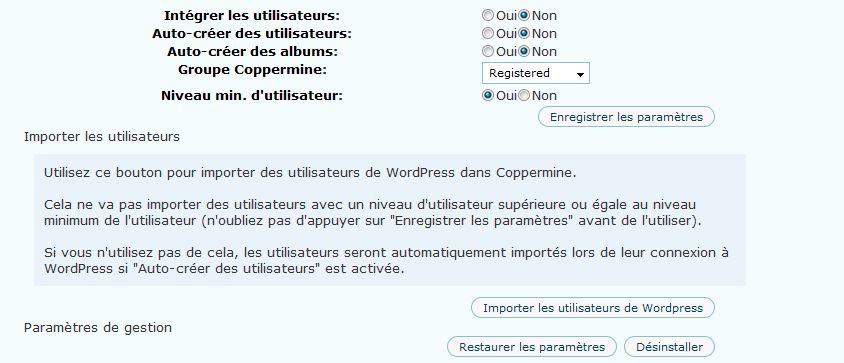
Hi.
I installed this plugin on WP 2.x and everything seems ok except for the fact that I can’t import users… I click the button (the database details are ok but it says The database connection is not shared with WordPress.) and I get an error down in my browser window: Error on page – Invalid argument – site-adress/wp-admin/options-general.php?page=optionmenu.php
Coppermine is installed in a folder and wp in another – in root I have something else. They have 2 separate databases. I just don’t uderstand what to do so that users can login to both with same details. I’m a biiit lost.
) I’m sure I’m doing something wrong, but what?
Thank you.
26 février 2009 à 11:48
OK, i am using the plugin WP user online. And this plugin shows me often Users browsing on the « Page not found » Page, and the referral url is something like the url i posted above.
Perhaps it has something to do with another thing i recognized: Opening an coppermine image from the index-page shows the image description in lightbox. If i open the same image from a static or single-article page the description is not shown.
Thank you for your support and for developing this very useful plugin.
Sebastian
26 février 2009 à 18:29
@Roxana
This will not solve your problem, but I strongly recommend you to update WordPress to security. I have hidden your version of WordPress to avoid possible problem… The latest version is 2.7.1.
« the database details are ok but it says The database connection is not shared with WordPress. » This is normal if WP and WordPress are not in the same database. By against I do not understand it, for a mistake. Did you save the settings before importing the users? If you don’t « role manager » to install, I think this is useless.
Your configuration doesn’t cause any problem since I have the same. Against by ensuring you have Coppermine and Wp up to date.
26 février 2009 à 18:33
@Sebastian
The description and information about the image is only available in lightbox.
For error pages, I sometimes get the same in « wp user online », I wonder if it’s not because the files are scanned by robots (Google…
?
27 février 2009 à 9:59
Carl, thanks for telling me about updating, I’ll do that soon.
They are not in the same database, indeed. Yes, I did save the settings before trying to import. I really need this to work because there’s no other option (as far as I know) for what I need. I have to organize a photo contest with voting and only users to be able to vote. So.. this plugin is my only hope.
I didn’t understand what you meant by « If you don’t “role manager” to install, I think this is useless ».
Thank you.
27 février 2009 à 21:06
What I meant is that WordPress and Coppermine is all their database don’t cause the problem I have the same configuration.
If I understand correctly, you want only your members get to vote for photos from the window lightbox? If that’s what we want, I’m sorry, but the vote since this window is unfortunately not restricted only to members but to everyone with access.
For limited access to these images and to vote the solution would be to make private page in the WP. Or give the link to Coppermine where it’s then possible to restrict the functions users have registered.
Forgetting the « role manager », I was mistaken. This is only for the message editor of WP.
2 mars 2009 à 7:07
Well, actually I want only members to post comments – and that inside coppermine, not on the wp page. I only want some images fetched to wp – through widgets BUT I NEED users to have the same account on wp and coppermine. I’m not really sure I explained this right.
2 mars 2009 à 19:10
I understand now your problem. Unfortunately this doesn’t seem possible since been version 1.4 of Coppermine and for my part I don’t have time yet to fix this compatibility issue.
As against, if you have access to phpmyadmin, you have Microsoft Excel, I can show you how to import existing users of WordPress to Coppermine. This is not ideal, is not the fastest, but it will work. (5-10 minutes…
3 mars 2009 à 1:15
So, if I switch to Coppermine 1.3 it should work?
And if it doesn’t work I guess your solution would be the best – but this would mean that everytime a user creates an account in WordPress I have to import it manually to Coppermine?
3 mars 2009 à 2:33
And I found an error – coming by email and I guess it’s connected with my problem:
A user tried to go to http://www.infobebe.ro/utile/u.....t_infos.js and received a 404 (page not found) error. It wasn’t their fault, so try fixing it.
They came from http://www.infobebe.ro/utile/w.....onmenu.php
PLUS, I upgraded to wp 2.7.1 and now I don’t see the Inserter Bar. And if I put [thumb:1][thumb:2] they appear one under the other. if I put [album:1] images appear with no border and title…
Lots of problems and I’m sure the plugin is OK, only I’m not functioning very well
)
3 mars 2009 à 18:22
I don’t know if Coppermine 1.3 is still available and I will not recommend it. And this without knowing if the function still exists.
And so what I would suggest you to do this manually each time. But if you have 100 users, this could be done as quickly as for a single user.
I’d like to correct the plugin, but I don’t have time now and not before the end of the month. I have another project underway that should be close as soon as possible and I demand my free time. Sorry!
3 mars 2009 à 19:03
For error 404 (…/script_infos.js), I have the same problem, but I am the only user to have access to the admin and guests are still arriving in this page, but why. This file is not part of Coppermine Integration.
For your problems (Bar Inserter, title for default) to check the options in the admin.
In config:
Use image inserter => Yes
Border ou shadow? For shadow => Display a shadow around pictures => Yes
For title => Display filename => Yes
4 mars 2009 à 2:09
I’ve tested it with Coppermine 1.3 and I still couldn’t import users.
The Bar inserter was there before upgrading to the latest wp version and then it dissapeared – those options are enabled. I don’t see the solution to this, But thank you for your support.
I’ll be standing by if you manage to solve the problems. Thank you again.
4 mars 2009 à 7:12
I dowloaded latest version from your site and am testing the integration on localhost using latest 1.4.20 COppermine, WordPress 2.7.1 and your plugin 4.6.2.6…When I enable editor integration, I cannot see post box and all other boxes in Write post page either in HTML or Visual View.
All I can see is the coppermine inserter box and a small window. Rightside boxes are preserved which are Publish, Tags and Category boxes. ALso If I click the plus sign on Options in coppermine inserter, it shows following error:
Fatal error: Call to undefined function _cpg_image_insert_shadow_dropdown() in \wp-content\plugins\coppermine\coppermine.php on line 3113
How to fix this?
4 mars 2009 à 7:31
Just wanted to inform…widget is working though.
5 mars 2009 à 18:59
Hello again! Just wondering, is there any way to make this extension use the Slimbox 2 plugin? Lightbox can take a while to load and slimbox is much quicker and easier on resources?
Thanks
6 mars 2009 à 10:25
My absence the last few days will continue, because I am currently sick. Sorry, can not meet you.
6 mars 2009 à 11:16
Well take care of yourself and get better soon!
6 mars 2009 à 17:14
Carl, take a good rest and get well soon!
Cheers Seppo
9 mars 2009 à 18:25
Thank you Dave and Seppo!
It took time, but I am better. Unfortunately, I have little time to devote to plug in yet.
@Roxana: your problem it’s with Coppermine 1.3 ou the last version? If you have Coppermine Intergration 4.6.2.6, download the previous one, because I just discovered that it causes more problems that it corrects. A problem that came out of nowhere and hit me well, yet that seemed non-existent at the time of discharge.
@Navjot Singh: Like Roxanne, download version 4.6.2.5. The latter is a problem that has slipped between the « fingers ». Thank you for your comment.
@Dave: Can you give me a link or download Slimbox 2? And I watched it’s possible to read EXIFS like in lightbox. But, as said for the others, yet this month my time is rare. Sorry!
9 mars 2009 à 18:42
The link to Slimbox 2 is here:
http://www.digitalia.be/software/slimbox2
Keep getting better first though!
10 mars 2009 à 4:25
Hi, carl! I’m glad you’re feeling better!
I tested this plugin with both coppermine 1.4 and 1.4, both vers. 4..6.2.6 and 4.6.2.5
)
In either cases I can’t import users and after the upgrade to the latest wp version I don’t even have the image inserter in Add new post. It’s going from bad to worse.
11 mars 2009 à 17:42
@Roxana Redownload the version 4.6.2.5, .6 Because the problem with « image inserter ». For users, because it’s lost for now.
And Dave, I take note …
And I’m sick again. Immediately treat immediately sick!
If the winter low end!
24 mars 2009 à 15:18
Hi Carl
I’m very happy that someone has taken over development of this integration plugin. The new version is fantastic.
I have a suggestion for a feature I really find missing:
Be able to insert more than one image on a line.
The « groups » feature is great, but you can only insert a whole album or the first X photos from an album. What if I want to insert 3 pictures but I want to choose which 3 pictures from the album? I can’t do this.
I also noticed that with the groups feature, the shadow doesn’t work.
Also, if using « Center Bar », the title/caption shows (if set) but if using « Center », the title doesn’t show.
Would it be possible to add in these features/fixes?
Thanks so much.
24 mars 2009 à 16:09
Hi again.
I don’t know what’s happened but I have my images opening in Lightbox, which works fine, and I had « Show Full Size » link and « Show Album » options turned on, and they were working fine.
But now all of a sudden those options are not taking effect and the standard lightbox is displaying with no title and no extra options.
I’m not sure what happened or how to get these options back.
I have « open in lightbox » option on.
I have « Coppermine – Lightbox 2″ plugin enabled.
Thanks
24 mars 2009 à 16:22
hmm I seem to have fixed the problem above by copying the « makers » directory from the coppermine installation and pasting it under the « coppermine » plugin folder.
Now the lightbox options are displaying correctly.
24 mars 2009 à 16:42
Sorry one more problem.
The « thumbnail » size setting seems very flakey, especially cross-browser.
In CPG, my thumbnail size is set to 150px.
If I set the size to 300x300px in the admin settings, when I have a [thumb:xxx:c]:
- Chrome and FF will display 150px thumbnails
- IE will display Stetched 300px thumbnails (stretched from the 150px versions)
If I leave the size blank in the admin settings, when I have a [thumb:xxx:c]
- FF will display 150px thumbnails
- IE will display some weird selection of sizes usually under 100px
- Chrome will display some weird selection of sizes usually under 100px
There is also some flakey behaviour when I use [image:xxx:c]
- Chrome will display a small thumbnail
- Firefox will display the full image
- IE will display a small thumbnail
It’d be great if these problems could be fixed.
Thanks very much.
24 mars 2009 à 16:44
Oh forgot to mention, the problems above are using IE7.
24 mars 2009 à 17:39
@Mike Salway
Many questions or suggestions …
The tag « album » in « Groups » may in fact select a album or X images. For images in particular, use the tag « Group » [group...][/group]. Simply use this tag and then put the images of the selected album. We can not select against the images and click the « Group », a problem that I have still not resolved.
For the shadows, it’s possible … What exactly?
For the titles, and since it was « always » according to the available titles are not show. But, hey this could be changed … Moreover, it’s possible to forcibly display the titles. Just add :T in the image tag or thumb.
24 mars 2009 à 18:04
I too don’t understand how you solved your problem with « lightbox ».
For thumb problems with IE in admin, I know. IE, I hate, it is extremely difficult to arrive at a result which is correct and that doesn’t appear in Firefox and Chrome. IE not support the standard and it’s a puzzle to make a few things in it. IE = don’t touch!
For the dimensions of the image, it doesn’t seem to work for the parameters in the admin. But, I can not follow you…
For the tag « image », I don’t have this problem in Firefox, IE 7-8 and Chrome.
For corrections to these many problems, I don’t have time yet, with a current project. But try to put me as soon as possible…
24 mars 2009 à 18:20
Hi Carl
Thanks for your reply.
I tried the group tag like this:
[code][group:c:T][thumb:787:c:T][thumb:786:c:T][/group][/code]
And it groups the two images which is great! But the shadows (on by default) and Title are not showing.
Are there any options for the [group] tag?
Any update on the cross-browser issues reported above?
Cheers and thanks!
24 mars 2009 à 18:22
Sorry I see just now your next reply re cross-browser.
I agree IE is a pain!
I understand regarding your time, I appreciate any time you can put into it.
Cheers
25 mars 2009 à 6:41
Hi all!
Im having trouble with the “More Images” (Image Selecter) Browser… It loads up in a pop up but doesnt show any albums or images…
I can insert images and albums just fine from the Options+ Groups+ Images+ buttons but i want to be able to brows the gallery aswell.
Wordpress is in the root and the gallery is in a folder called 2009… Anyone know how to fix it?
Using WordPress 2.7, Coppermine Photo Gallery 1.4.21, Coppermine Integration WP 4.6.2.6.
Another question (as image selecter doesnt work):
I would like to display images related to posts in WP.
Im using runPHP and can implement php code in posts, iv tried this:
php cpg_db_search_albums($the_images_file/title_namephp cpg_search_pictures($the_images_file/title_name)
php cpg_db_search_pictures(’the_images_file/title_name’)
None of these works…
Is this even possible?
Question number 3:
In my themes search page, it displays this on the side:
Search Results
You searched for ‘keyword’. Your search returned 2 results.
Can i make it show stats for cpg this way also?
Search Results
You searched for ‘Image_keyword’. Your search returned 2 file(s).
Thanks in advance, and
Thanks for a greate plugin!
25 mars 2009 à 18:09
@Mike Salway
In checking, I realized that the shadows work in a group unless it’s a common shadow. Test this: [group:c:s=1][/group]
For title nothing to do, and it’s built. But it could easily be changed in a future version…
IE do I have nightmares
25 mars 2009 à 18:21
@hugo
For your 1st problem, it was resolved in version 4.6.2.7. An error was slipped in version 4.6.2.6 and it was withdrawn.
What WordPress and/or Coppermine or in folder not cause any problems.
I don’t understand your 2nd question. Sorry!
I don’t quite understand your 3rd question. If you do a search from WordPress, you will get the results of research in the articles written in WordPress, and the images of Coppermine. (If you have replaced or adapted the search.php file of the theme used in wordpress.) Against by any « stat », as well as for WordPress.
26 mars 2009 à 14:45
@carl
Ok! new version word for gallery browser, thanks!
2nd question:
I mean, if i write a article about « Cars », i would like to display all images of « Cars » from my gallery in the post. This would be easy if had a « Cars » section in my CPGallery, but they are mixed in diffrent categorys and albums.
So, i would like to show all images named cars.jpg and titleed Cars in the post in a easy way… maybe i can insert a php code in the post so that it searches for images named « cars » and displays it in the post, as it displays CPGallery search images.
3rd question:
What i mean here, is:
when i do a search in wordpress for « cars » it displays any post with the name « cars » in it.. It also displays all images named « cars » from the gallery.
What it also does in my sidebar is displaying number of post results for the search « Cars », but not the number of image results.
I would like to show the numbers of files found from CPG in my wordpress theme…
Hope this clears up things
Thanks for a quick answer
Regards
26 mars 2009 à 18:13
Ah, then I understand your question. It’s not possible yet, but it could be interesting. It remains to see if I can achieve, but I like the idea.
For the 3rd question, I understand, but this seems specific to your theme. I have never obtained such a result with my WordPress themes. I would have to see the theme you are using, but I doubt that it can deliver the results you want.
27 mars 2009 à 5:49
@carl
oh i see! hope you can achive this
im using this theme:
http://themasterplan.in/tma
looking forward to next reply!
best regards and thanks again for a wonderfull plugin.
29 mars 2009 à 17:56
Sorry not to have you answered before, I was very busy on this weekend. When I have a free time I watch this and the problems mentioned above, for against this will not be for a few weeks.
31 mars 2009 à 15:22
hello again!
I can view the comment box in the lightbox when clicking on images produced from searches, without having lightbox installed on Coppermine (though not from post inserts like [thumb:xxx]… But i can not view votes/ratings in the box. DO i really need to install lightbox on coppermine? Having big problems with installing. Anyone have a easy guide/plugin?
Best!
31 mars 2009 à 17:51
To activate an option (votes / ratings or other), it’s sufficient to activate in the configuration page Coppermine Integration – section parameters for lightbox.
Lightbox in this file .zip of Coppermine Integration should be only be activated in WordPress. Lightbox doesn’t Coppermine only WordPress.
3 avril 2009 à 7:48
Hi Carl,
I’m running 4.6.2.7 and just ran into a problem I already experienced with previous versions, but not reported yet. Using the image selecter tool, I get two error messages (see below) and have pictures duplicated. The picture at the right of the rows is repeated as first on the next row. I can email you a screenshot to illustrate what I mean.
Except for that ; great job.
Thanks,
Arnaud
Warning: mysql_fetch_object(): supplied argument is not a valid MySQL result resource in /var/www/web3/html/croesnet.eu/wp-content/plugins/coppermine/coppermine-server.php on line 100
Warning: mysql_fetch_object(): supplied argument is not a valid MySQL result resource in /var/www/web3/html/croesnet.eu/wp-content/plugins/coppermine/coppermine-server.php on line 107
///
3 avril 2009 à 8:27
Hi.
I’ve got some problems.
1st. In the configuration window there is text « To choose which users can use the Inserter Bar, please use Owen Winkler’s LINKHERE. ». When i click on LIKNHERe it goes to wrong address « mywebaddress\wp-admin/Role Manager ».
2nd Is there any way so when i click « See the album » in the lightbox window under the picture, it will go to the first page of album where the picture is stored in CPG (showing thumbnails instead of the picture in the album)?
3 avril 2009 à 9:12
@Arnaud
To send me a screenshot my email address is this.
@Marcin Wilk
As a link, you should normally have this: http://redalt.com/Resources/Plugins/Role+Manager. For against, I don’t know if it works yet, since I’ve never used and never heard a comment on it.
Should I add a link to « see all the image of the album » to meet your request…
3 avril 2009 à 17:42
Thank You Carl for very fast respond. About the link. It is look god, but link goes to bad address, the problem is in the source (link is http : // redalt.com/wiki/Role+Manager without spaces, i do them because comment sometimes are not added in wordpress).
And about error that reported Arnaud i got same, i will send You a screenshot.
About « see all the images of the album » option it would be very nice
Thanks again for answer.
3 avril 2009 à 17:43
Uh it didn’t add the code properly. It looks like that in the sources:
http://redalt.com/wiki/Role+Manager3 avril 2009 à 17:44
Code option didn;t work too for the comment. Too bad, well just check it out yourself then
3 avril 2009 à 17:52
To link the problem is simply that I inverted the URL and the text in the original version (in the version translated in french, I corrected this problem.)
Now http://redalt.com/wiki/Role+Manage And this should be Role Manager
Arnaud same mistake? Weird!
I got your screenshots. Oddly you have the same error using 2 different mode.
I look at that in a few weeks, at least I have more time than now.
11 avril 2009 à 11:53
Hi Carl!
Hows everything going?
I have another question regarding album views in wordpress…
As it is now, you insert a album in you wordpress post, and it displays all the pictures that it can find in that album.
However, it does not show the pictures linked to that album via Keywords. Is this possible to fix?
11 avril 2009 à 14:51
another thing
iv noticed that when i set the permalinks to other then default, eg. that dont include the .com/?p=post_id, the function to comment pictures dont work in wordpress.. Anyone know how to fix this, maybe someone here runs a blog with custom permalinks and working comment function in lightbox?

11 avril 2009 à 16:46
This goes well …
It’s not possible to show the images by keywords. Can I do? I don’t know.
For the 2nd question, I don’t know.
10 juin 2009 à 6:34
Bonjour,
Avant toute chose, un gros merci pour plugin qui m’a l’air fort intéressant
Cependant j’ai un petit problème à l’installation. J’ai suivi le readme.txt pour l’installation mais je bloque à un endroit précis : Cliquez sur le lien dans Admin –> plugin : ‘Go here to configure’. Je ne trouve pas ce lien. J’ai bien le plugin Coppermine dans mon interface, je peux l’activer, mais je ne vois pas ce lien pour faire la configuration…
Merci de m’aider
10 juin 2009 à 9:45
Bonjour,
Ah je vois la cause de votre problème, c’est que les versions précédentes (1.3.xx) le lien se trouvait à même l’installation des extensions. Le fichier readme.txt n’a pas été changé (pour les version 1.4.xx) et depuis la configuration du plugin se fait via la section Réglage dans l’admin de WordPress. Dans Réglages, tu y verras Coppermine Integration et de là, tu pourras tout configurer.
Pour éviter la confusion pour d’autre, j’ai édité le fichier readme.txt en conséquence. Cela évitera le même problème pour d’autre. Merci de me l’avoir signalé!
10 juin 2009 à 10:23
Bonjour Carl,
Merci pour l’information. Je comprend mieux. Cependant, le lien n’apparait pas non plus dans la section réglage dans l’admin (pour moi en tout cas…
. Par contre, avec ce que j’ai lu ici, j’ai réussi à lancer la configuration en tapant :
http://adressedemonsite/wp-adm.....config.php
Avec, cela je peux configurer. Par contre, je ne comprend pas pourquoi cela n’apparait pas dans mes réglages… Je continue à chercher…
En tout cas, merci à vous
10 juin 2009 à 10:37
Simple question as-tu WordPress 2.7.1 d’installer ou l’ancienne version 2.0.11? Je ne suis pas certain du résultat dans ce dernier.
Pour pouvoir avoir le lien dans les réglages, il faut avoir activer le plugin avant. Sinon, il n’y ai pas.
10 juin 2009 à 10:58
Pour la version j’ai la 2.7.1.
J’ai bien activé le plugin et il fonctionne maintenant grâce à la configuration que j’ai pu faire directement en appelant le fichier. Mais je ne vois toujours pas le lien dans les réglages.
Par contre, si j’active le plugin stimuli-lightbox2, là j’ai bien son réglage disponibles (pour stimuli-lightbox2 dans réglages), mais pas celui pour coppermine…
10 juin 2009 à 12:01
Vraiment bizarre!?
Normalement tu devrais avoir un lien comme ceci: http://adressedetonsite/wp-adm.....onmenu.php
10 juin 2009 à 12:23
Non malheureusement je ne l’ai pas… Et quand je lance le lien que tu m’indiques (avec mon adresse de site), j’ai bien mon menu wordpress à gauche mais une page blanche à droite.
Par contre, avec http://adressedemonsite/wp-adm.....config.php cela fonctionne, j’ai comme une page de configuration.
Le principal c’est que cela fonctionne, mais je n’ai pas d’explication du pourquoi le lien ne s’affiche pas…
Merci pour ton aide
10 juin 2009 à 15:04
Je ne sais pas si cela peut aider, mais as-tu essayer d’enregistrer les changements dans la page réglages -> permaliens ? (Pas besoin de toucher à rien, simplement d’enregistrer les modifications).
10 juin 2009 à 16:48
Bonne idée, j’ai fait cette manipulation mais cela n’a rien changé malheureusement
Merci
15 juin 2009 à 17:19
Hi
There appears to be some incompatibility with WP2.8. Whenever I save a post, I get the following error:
Warning: Cannot modify header information – headers already sent by (output started at /home/iceinspa/msalway/public_html/wp-content/plugins/coppermine/coppermine.php:799) in /home/iceinspa/msalway/public_html/wp-includes/pluggable.php on line 865
If I disable the plugin, it works fine (of course).
Can you please release a WP2.8 compatible version? This problem only started after upgrading to WP2.8. (i’m using 4.6.2.7 of the plugin).
Thanks
15 juin 2009 à 18:31
Hi
The error message you where? I also have WP 2.8 and Coppermine Integration 4.6.2.8 and I don’t get this error message.
It’s difficult at the moment to find solutions to the problem because I have problems with servers that I am not able to resolve and are independent of extensions used.
Unfortunately I cann’t, you promised to find a fix for this weekend. I must start by correcting my problems and I don’t know if I have time.
As against, if someone finds a solution, I will gladly make it available to all.
If others have a compatibility problem or if everything works, I would know …
And sorry Mike Salway, cann’t do more for this moment…
18 juin 2009 à 11:51
Hello carl
A croire que les français n’ont pas de probleme
…
Bon voilà je débute avec Wp et j’ai les petits soucis suivant:
J’utilise Wp2.8- Lightbox 2 et coppermine 4-62.8, Coppermine 1.4 et lightbox 1.1. Wp et coppermine sont au meme niveau de repertoire.
J’ai épluché tout le web mais pas de réponse ou solution …
Peut être donneras tu un peu de ton temps au novice que je suis
1) Dans « groupe » aucun choix d’image possible la liste reste vide
2) Dans « plus d’image » le browser s’ouvre mais n’affiche aucune image
dans la colonne de gauche « Galerie » est affiché mais pas clickable
3) Je pensais que la case « Insérer : tout- 1-2-3 … » permettait de
définir le nombre de photos a afficher. qq soit le choix rien ne
change
4) Je n’arrive pas a afficher pour une sélection de x images, une
seule image clickable qui ouvrirait dans lightbox l’ensemble de
la sélection … heu là, je suis peut être pas tres clair …
Merci d’avance …
18 juin 2009 à 17:29
Salut Nono,
Si les français semblent avoir peu de problème, c’est que cette page a également son équivalent francophone, d’où le peu de problème en français.
Humm… par où commencer? Pour commencer as-tu configuré l’extension? Dans réglages -> Coppermine Integration et est-ce que la connexion avec Copppermine est bien établi?
Si la connexion est bien établi:
)
1- Dans groupe, tu devrais avoir la liste des albums disponibles et non les images individuelles.
2- « Galerie » est en effet pas cliquable, mais sous ce dernier, tu devrais avoir la liste des albums. Donc, la connexion semble inexistante.
3- Insérer: tout 1-2-3 permet de définir le nombre d’image à afficher d’un album. Pour des images individuelles, il faut soit y aller via la fenêtre « Plus d’image » ou via la section « Image » qui affiche les dernières images ajouter à Coppermine. Si cette ligne est vide, c’est probablement dû à un problème de connexion. (Je sais, je me répète.
4- Vraiment pas clair en effet. Il faudra que tu formules tout ça un peu plus clairement.
Je ne peux par contre te confirmer si tout fonctionne correctement sous WP 2.8. J’ai en se moment de gros problèmes de mon côté et toute l’admin est endommagé et l’extension ne fonctionne que partiellement pour moi. Fonctionne sur le site, mais sans plus. Et je suis également sous WP 2.8. Bien des images dans cette page devrait être afficher et rien ne fonctionne…
… mais bon si tu as d’autres questions j’essayerai d’y répondre de mon mieux, tout en essayant de corriger mes problèmes de mon côté.
19 juin 2009 à 1:52
Cool Carl, enfin presque.
Aller droit au but:
Oui l’extension est activée, la connexion avec coppermine est ok ( a part le fait que Wp et Cp ne partage pas la même base de donnée)
Dans les trois boutons option/groupe/image :
a/ des miniatures sont présentes ( j’ai paramétré pour 7) mais
c’est toujours les mêmes.
b/ Impossible d’afficher les albums dans Groupe, donc toujours les
mêmes images dans le scroll hz
c/ et pour le browser rien de rien, pas un pixel d’image visible.
Juste « gallerie » non clickable et le text de presentation du
browser case de droite. De toute façon je pense que les deux pb
sont liés.
Je me suis posé la question d’une version java pas a jour … mais non !
Je ne t’ai pas précisé que je suis sous Firefox.
J’ai testé avec Ie6, pas mieux !
Bon, voila ! j’en suis a deux nuits blanche sur WordPress, le blog, les plugs etc … j’ai maintenant un pb avec coppermine qui me fait dire que c’est peut être lié : J’ai mis des albums en « Public » mais toute connexion anonyme n’affiche aucun album … pfff.
Enfin pour finir une juste récompense de mes recherches sur le net m’ont fait découvrir un prog pour developper du blog comptablible WP/joomla etc et ce, sans une ligne de code. Il existe une version trial. Et de tout les progs ou soit disant assistant de création que j’ai essayé, celui là c’est : le soleil, la plage et les cocotiers:
http://www.artisteer.com/ (payant)
Merci encore de ton dévouement et ton efficacité. Je vais être patient
19 juin 2009 à 2:00
… Heu, je relis ta reponse …
Dans groupe non seulement je n’ai pas les albums, mais je n’ai pas non plus le choix d’1 image … rien juste « Sélectionner … »
Mais tout ça est lié.
Tchô
19 juin 2009 à 10:37
Que les bdds de WP et Copppermine ne causent aucun problème, je suis dans les mêmes conditions. Et l’extension tourne également mieux sous Firefox que IE côté administration… Et l’extension requis seulement que le javascript soit activé sur ton navigateur, ce qui est le cas de la majorité du monde. Donc, pas besoin de java pour ce dernier.
Si tes albums ne sont pas disponible au public dans Coppermine, peut-être que cela affecte également la disponibilité de ceux-ci dans WP.
Dans la configuration de l’extension, dans paramètres généraux as-tu donné ton id, ton nom d’utilisateur et ton mot de passe? Normalement, c’est facultatif, mais cela peut peut-être aider.
Je ne comprends pas par contre que se soit 7 fois la même image que tu aies pour les dernières images ajoutés à Coppermine. À moins que tu y aies ajouté 7 fois la même image.
As-tu essayé d’ajouter cette image dans un message pour voir si elle était disponible sur ton blog? Cela fera au moins ça qui fonctionne.
« Plus d’image » ne fonctionne pas, car il ne voit pas les albums. Pourquoi? Bonne question, mais peut-être que le problème se trouve via la configuration de Coppermine.
21 juin 2009 à 14:15
@Mike Salway
My problems are fixed and I can now say that Coppermine Integration 4.6.2.8 is compatible with WP 2.8 and Coppermine 1.4.24. So your problems don’t seem to come from this plugin… but why this error? I don’t know.
22 juin 2009 à 18:36
Hi Carl
Thanks – it was my problem after all. I moved my blog to a new host, and at the same time, updated to WP 2.8.
I updated all the DB names/connection details I could find, except the one in the Coppermine Integration plugin section! doh!
I updated with the correct DB name/username/pwd and all is fine now.
Thanks!
5 septembre 2009 à 2:21
hi, i would like to ask if is it possible to redirect user logged in to current page. because this plugin redirects users to the dashboard whenever they log in. if possible, how can i do it? thanks
5 septembre 2009 à 8:36
BB3, I don’t understand your problem. Why this plugin redirects users to the dashboard? Can you be more specific…?
8 septembre 2009 à 8:33
what i want to do is to redirect users when they logged in into the current page. (i am using « sidebar login plugin »
it is because when users log in they are being redirected into the user dashboard
8 septembre 2009 à 17:35
Ok, I understand what you want now. This has no connection with the plugin Coppermine Integration. I don’t see how make this. sorry
12 septembre 2009 à 13:21
Hey Carl,
I have installed your plugin, it works fine with the widget and posts.
Now i have the question how i can add the total gallery to the head menu, just as you have. In the top menu of this page you have the option « Album », when i press on that option i get your total gallery in the wordpress page. How do i do that?
regards,
robin
12 septembre 2009 à 13:51
Hi,
For the link « album » to the head menu is simply a link. The album is then visible in Coppermine and not WordPress. The link added to the code header.php file of my theme. Isn’t an option of plugin Coppermine Integration, simple HTML.
12 septembre 2009 à 14:29
Hi Carl,
I have sent you an PM, maybe you can help me further on how to integrate.
regards,
robin
12 septembre 2009 à 17:41
Sorry, I have not received your PM?
14 septembre 2009 à 9:54
Hello Carl,
Thanks for your reaction.
Now i have another one. I have installed the WordPress Widget and the photo’s are running smoothly. Now i want to have the exif data of the photo’s below the picture in the pop-up of Lightbox when i click on the photo. Is this possible? I have set the options of the exif data in the configuration of the Coppermine INtegration, but i do not know where they should appear.
Hope you can help me.
Regards,
Robin
14 septembre 2009 à 17:41
Yes it’s possible have exif data in pop-up of Lightbox. Are you sure you enable the desired options in configuring the plugin?
2 octobre 2009 à 6:31
Hello, I have 2 questions please. Bear with me as I am not very technically inclined. One – do you have to separately install lightbox for the Coppermine to WP plugin to work? And two – I installed the plugin and it seems to work fine as far as showing up on the WP page, but the Coppermine Integration settings page gives me this:
These values must be the same as in config.inc.php, which is located in your Coppermine-Folder in the include subfolder.
WordPress is able to automaticaly fill in these values (only works if WordPress and Coppermine are installed on the same domain).
And then asks for Server, User, Password, etc.
Now I know one issue – I have my coppermine gallery on its own subdomain and not on the same doamin as the WP. Can this issue be overcome to allow the plugin to work? If so, how? And do I have to fill in the Server, User, etc?
Sorry for such elementary questions. Thanks.
Gina
2 octobre 2009 à 9:18
Yes install lightbox for Coppermine is separately of plugin Coppermine Integration.
The plugin work with Coppermine gallery in other subdomain.
Automatic search of information connections will not work. Simply enter manually setting the db (server, user…
of coppermine gallery in the plugin configuration.
18 octobre 2009 à 1:23
Hello!
Is it possible to display the album, not the « displayimage.php » when you click on the thumbnail?
Thanks in advance!
18 octobre 2009 à 9:23
No, it’s nto possible. But it’s possible to display a full album in an article
27 octobre 2009 à 8:38
Bonjour,
D’abord, félicitations et merci pour cette extension. Je me sers du Widget de sidebar depuis un bout de temps et il fonctionne très bien.
Dernièrement, j’ai décidé d’intégrer complètement ma gallerie Coppermine sur mon blog et ça ne semble pas fonctionner. J’obtiens une erreur lorsque je tente de mettre une photo ou un album dans un article ou une page. Il semble y avoir un problème avec le coppermine.js
Voici l’erreur que j’obtiens:
« Détails de l’erreur de la page Web
Agent utilisateur : Mozilla/4.0 (compatible; MSIE 8.0; Windows NT 6.0; Trident/4.0; SLCC1; .NET CLR 2.0.50727; Media Center PC 5.0; .NET CLR 3.5.30729; .NET CLR 3.0.30729; OfficeLiveConnector.1.4; OfficeLivePatch.1.3)
Horodateur : Tue, 27 Oct 2009 13:32:40 UTC
Message : ‘tinyMCE.activeEditor.selection’ a la valeur Null ou n’est pas un objet.
Ligne : 175
Caractère : 3
Code : 0
URI : http://www.joelducharme.ca/wor.....permine.js
Message : ‘tinyMCE.activeEditor.selection’ a la valeur Null ou n’est pas un objet.
Ligne : 175
Caractère : 3
Code : 0
URI : http://www.joelducharme.ca/wor.....permine.js«
Avez-vous une idée de ce que j’aurais pu faire de mal? J’ai tenté de désinstaller et réinstaller le tout, sans succès.
Merci.
27 octobre 2009 à 18:05
Obtiens-tu cette erreur via le pop-up « Plus d’image »? Est-ce que cela fonctionne via les images récentes ou pour les menus en haut de page d’un article?
Peux-tu essayer si tu obtiens les même erreur avec la version 4.6.2.5 de l’extension?
Sinon étrange cette erreur…
27 octobre 2009 à 18:09
J’obtiens cette erreur pout toutes les fonctions pour insérer des images dans un article ou une page.
Je vais essayer de désinstaller la version 4.6.2.8 pour installer cette version. Je t’en donnerai des nouvelles.
27 octobre 2009 à 18:58
Salut Carl,
Je viens de désinstaller le tout et réinstallé la version 4.6.2.5 et j’obtiens toujours la même erreur. Le lien se fait entre mon blog et ma gallerie Coppermine puisque lorsque je clique sur les différentes options pour ajouter une photo (Plus d’images, groupes et images), je vois mes photos.
Je dis comme toi… étrange comme erreur. Je ne m’y connais pas beaucoup en Javascript et en php, donc, je suis un peu perdu ici.
J’apprécie beaucoup ton aide.
28 octobre 2009 à 17:37
As-tu d’autres extensions qui ajoute des fonctionnalités à l’éditeur d’article? Quel est ton navigateur? Mozilla 4 est-ce Firefox? Même problème sous IE?
28 octobre 2009 à 17:54
J’ai enlevé les toutes les extensions qui pourraient causer des conflts et encore la même erreur. Je travaille sous IE8, mais, j’ai téléchargé Firefox pour voir, et avec celui-ci, je n’obtiens pas l’erreur, par contre, ça ne fonctionne quand même pas.
En passant, je vois l’erreur dans la barre d’état. Lorsque je clique sur une option pour insérer une image ou un album, j’obtiens le petit icône (triangle jaune avec point d’exclamation) et le message « Erreur sur la page ». Lorsque je double-clique sur celui-ci, c’est là où je vois les détails que je t’ai copié-collé.
28 octobre 2009 à 18:00
Je vais essayer de trouver une solution en fin de semaine (la semaine je n’ai pas suffisamment de temps), mais ton problème me semble très étrange.
28 octobre 2009 à 18:09
Merci. Je vais continuer à y travailler de mon côté. Je vais essayer de désactiver TOUTES mes extensions sauf celle-ci pour voir.
28 octobre 2009 à 21:16
Bonsoir Carl. J’ai réussi! Il fallait que je coche l’option « Désactiver l’éditeur visuel pour écrire » dans les options de mon profil. Ça fonctionne très bien!
Merci pour ton excellente extension!
Va voir le résultat http://www.joelducharme.ca
28 octobre 2009 à 22:14
Salut Carl,
J’ai réussi. Il fallait que je clique sur « Désactiver l’éditeur visuel pour écrire » dans les options de l’utilisateur. Bizarre, mais ça fonctionne. Ça complique aussi l’édition des pages, mais, c’est ok. Ce n’est pas comme si je vais travailler constemment dans ceci.
En tout cas, merci pour ton aide. Si tu veux voir ce que ça donne… http://www.joelducharme.ca/wordpress/?page_id=525
29 octobre 2009 à 17:37
Salut,
Cela demeure tout de fois étrange que tu doives désactiver l’éditeur visuel pour que cela fonctionne. Car, je n’ai pas ce problème avec ce dernier.
Si jamais, je trouve la solution, je te le ferai savoir.
10 novembre 2009 à 18:52
hi,
i’ve installed the plugin with no problems…
but i’m having problems with the short codes to display images in post’s
is there a list any where on what the short codes are i.e. [album:xx]
_aero
10 novembre 2009 à 19:07
To add the code, simply add them in the plugin configuration (settings -> coppermine integration -> section: Integration in the editor)
11 novembre 2009 à 7:50
Hi. I finally managed to make ity work after upgrading to your latest version. BUT
If a user creates an account in wordpress, the first time he/she logins they are also logged in coppermine. After logout, when logging in again the user isn’t logged in coppermine too.
The user appears in the coppermine user list. The user can’t login with the created username and pasword from the Coppermine login page. They are logged in wordpress, but not in coppermine.
Also I still can’t import users from wordpress but you said that could be done via phpmyadmin.
So, tell me if you need more details, maybe you could help…
11 novembre 2009 à 7:59
And I discovered that coppermine administrators who are also wordpress admins are logged in coppermine too after logging in wordpress. I’m probably missing something about settings
11 novembre 2009 à 10:13
thank you carl for you help…
i’ve got two more quetsions, im using lightbox to view images in my wordpress, 1.what do i change in the css file to get lightbox centerd. 2.what do i change to so that when i click on the thumbnail the it opens the full size file not the normal_mypic.jpg file.
13 novembre 2009 à 15:47
@aero
For center « see the album » => file lightbox.css of your theme
Delete this line: width: 50%; in the section .detail{ (line 122)
For open full size only on the thumbnail :
File coppermine.php
Replace this:
if ($CPG_CONFIG['make_intermediate'] && $usenormal ) {// Prefix
$prefix = 'normal_';
$query = 'SELECT value FROM '.get_option('cpg_table_prefix').'config WHERE name = "normal_pfx"';
$req = mysql_query($query);
while ($data = @mysql_fetch_array($req)) {
$prefix= $data['value'];
}
$uri = $cpg_uri.$image->filepath.$prefix.$image->filename;
} else {
$uri = $cpg_uri.$image->filepath.$image->filename;
}
by
$uri = $cpg_uri.$image->filepath.$image->filename;@Roxana … next time
18 décembre 2009 à 17:23
hi, are there any solutions in this problem?
« Value Error : width Parse Error expression((this.offsetWidth>=this.offsetHeight) ? Math.min(parseInt(this.offsetWidth), 100 ) : true) «
18 décembre 2009 à 18:05
This problem occurs when? Which browser, IE, Firefox?
6 avril 2010 à 10:43
HI, well i installed at my site but how its work. Its not showing me in editor section. I mean just showing me Coppermine Integration page and i fill the all options, but nothing happen. Only just showing widget.
If any one can help me, i shall be very thankful.
8 avril 2010 à 17:34
For this to work requires that the plugin is activated and the configuration works.
Next, we need the option « Use image inserter » is activated (yes),
Use popup upload window at yes (add this button).
It has a problem with pop up to select images. You need to download version 4.6.2.5 and replace the file coppermine-browser.php the latest version from the latter.
21 mai 2010 à 9:26
Hey! Amazing script. Thank you so much for this.
I am having this one problem though with it on the Coppermine Integration page in the settings of my wordpress.
It comes up with this error which doesnt let me use any of the plugins functions correcty:
9 juin 2010 à 1:02
Hi, is there anyone who tried the Plugin with Coppermine 1.5.x?
Thanks
Sebastian
14 juin 2010 à 17:11
I don’t know
1 septembre 2010 à 11:23
Bonjour,
Plugin installé avec succès sur Worpress 3.0 / Coppermine 1.5.8
J’ai le même problème qu’Arnaud (3 avril 2009 à 7:48), je ne sais pas si une solution a été trouvée depuis ?
Mais dans l’ensemble ça paraît exploitable. Merci ^^